skip to main (ir a principal) |
skip to sidebar (ir al sidebar)

The beauty of Yahki is its simplicity as a social learning environment. It’s an amazing tool! Yahki education channel delivers the toolset in a private learning space for each school or campus, yet naturally and safely extends to the wider community, even globally. The following video shows how. Yahki enables everyone to be a learner and everyone to be a teacher, leveraging Web content, mainstream social media, and school/campus and personal digital resources.
Yahki is online, supporting almost every device and language, 24/7. Students and teachers can curate, create, share, assess, refine, collaborate and connect, locally, nationally, globally. Yahki is an open platform that sits across personal, local and enterprise application layers. Yahki reflects where learning is today, overcoming many of the barriers of traditional education.
Teachers and students often refer to Yahki as the 'glue' that brings together content, ideas, creativity, formative assessment and reflection. Yahki is the ideal mashup of social media, the Web and effective learning. Yahki education channel enables users to ‘channel’ specific Web, premium and user- generated content through their school/campus class, peer and teacher networks. Yahki respects the needs of users as members of learning communities and the wider community.
Yahki’s simplicity and the channel concept set Yahki apart, solving issues for learning communities disrupted by Web 2.0. http://education.yahki.com/ enables you to tell your own story - use the web content, links, photos & videos to create a new story & share it with your friends on Facebook and Twitter. Yahki was released to provide the world’s first bridge between mainstream social media and a safe school or campus learning channel. Yahki now allows each student, teacher and parent to easily collect, mash up and ‘channel’ posts safely to their school network (teachers and students) or to their public network (friends and family) in one environment. There is no longer the need for a public social media environment and a separate school environment - Yahki is true to each.
Features :
Collect
Use Yahki to collect items from the Web. Browse or search to collect pictures, text information, video, tweets and posts from the Web. Curate collected items in folders (Yahki Sets) without losing links to original Web sources. Build your Yahki Sets based on interests or studies, all drag and drop
Mash up
Use Yahki to create mashups. Manage and mash up your social media and items collected from the Web. Organize, annotate, and update items, adding your thoughts and perspectives, all from one screen.
Share
Share informal Yahki mashups with friends and family through Twitter, Facebook and Google+. Share professional Yahki mash ups through blogs and networks like LinkedIn

Curation tool Bibblio to Collecting the world's best knowledge on one platform. Start learning something new today or help others discover quality materials you've enjoyed or created, by simply linking to them on Bibblio.
How Bibblio works . Features :
Learn
Bibblio is here so you can learn. Learn anything, anytime in any format you want. Some people call it casual learning – we don’t really care what you call it. Start searching, browsing and learning.
Inspire
Bibblio is also for you who like to help others find inspiration and knowledge. Whether you are creating your own learning materials or just know a whole bunch of good videos, slides, links or books that others can benefit from then you have come to the right place. Help us find by uploading the best stuff from the web so that we can help everybody.
Support
The best way to support Bibblio is to support the guys who make amazing pieces of knowledge. Share their stuff, talk about it and promote it across your social channels. If you share the bibblio link then you help us at the same time. It is that easy. You can also donate directly to the people you really like to allow them to keep up their great work, or you can click here to learn more about how to support Bibblio on it’s way to become the greatest site for knowledge on the internet.
The Student Edition of scrible is a free upgrade for students
that adds the sweet features shown below.
If you already use scrible and registered with a “.edu” email address, you can upgrade to the Student Edition for free from the Settings Page in your account. If you’re a new student signing up with a .edu email address, you’ll be shown an option to upgrade for free during the sign up process. If you have a .edu email address but didn’t originally sign up with it, you can add it as a secondary email address via your Settings Page. This will then allow you to make the upgrade and use http://www.scrible.com/student
5 Powerful New Features
The 5 powerful new Student Edition features enable you to create sophisticated reports from you researched articles, easily capture citations while you’re reading online, generate bibliographies with one click, distill all of your highlights and notes into simple summaries and collaborate with others via group, topic or project specific Shareable Libraries. Nearly all of these features (except for citation capture) are accessible from within your Library (as shown here) once you’ve upgraded to the Student Edition.
Reports
The first new feature is a robust report interface. We’ve added the ability to bring the annotations from your saved articles into a rich text editor. Once you’ve selected the articles you want to work with and clicked the Add to Report Button in your Library, we take you to the report interface, which is a split pane view with the articles shown in a Source List on the left and the text editor on the right. You can selectively click on annotations in the Source List to add them to the report on the right. This allows you to easily bring your annotations into the editor and integrate them into your reports using the fully featured editor. Once you’ve finished writing, you can share the report using all the methods you’re used to, such as social media, permalink and email.

Citations & Bibliographies
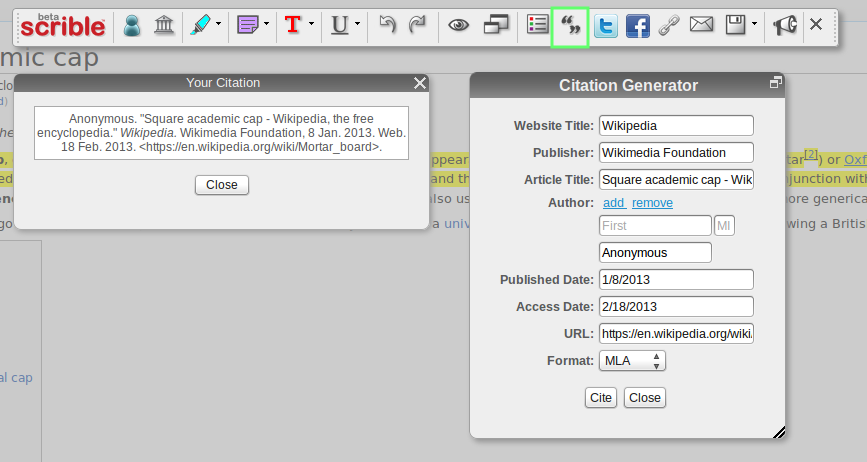
To go along with report writing, we’ve tried to ease a major pain point: proper citations and bibliography creation. We’ve added a citation manager to our Toolbar so that you can create citations right on the webpage or article as you’re working. When you click on the Citation Button in the Toolbar (shown here with the green box around it), you’ll be shown the Citation Generator Window. We autofill some of the citation info and you can easily fill in the rest. Once you’re done, you can automatically create citations with a single click in all the major academic formats, such as MLA, APA and Chicago. This citation info is saved with your article for future use so that once you’ve filled it out, you’ll never need to touch it again.

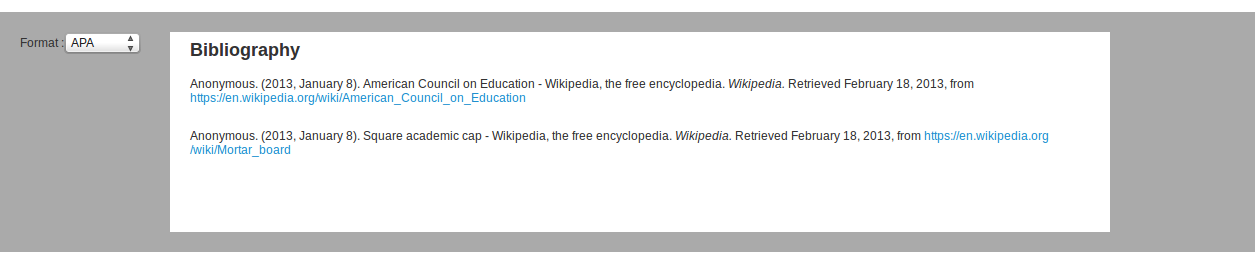
Once you have your citations saved, you can pull them into our dedicated bibliography interface, seen in the screenshot here, or directly into the report interface described earlier.

Summaries
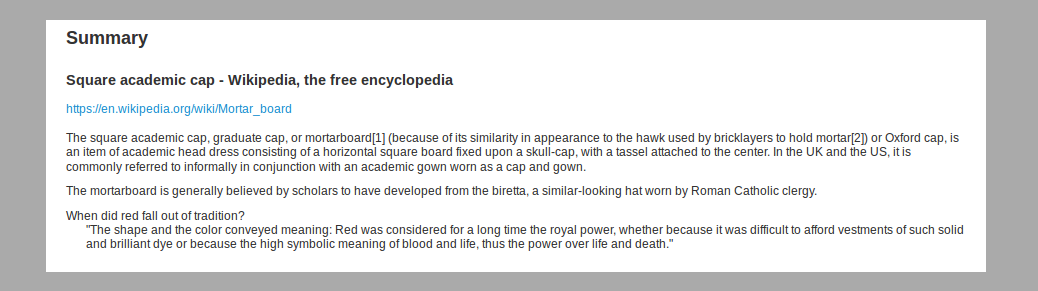
If that all sounds too heavy, we also added a summary view of your annotations along with some meta information about the article. So, you can distill down and extract out just the important highlights and notes. By showing you just the good parts, you’ll have a clean view of what matters most. Shown here is the summary for just one article, but you can pull in as many saved webpages as you like at once.

Shareable Libraries
Lastly, we’ve added the ability to collaborate via multiple, Shareable Libraries. You can now create separate libraries for various groups, topics and projects to keep your saved and annotated articles organized in an orderly fashion. You can also invite other folks to your Shareable Libraries so that you can work together to collect, save and comment on articles and Web content. If you’d like to learn more about Shareable Libraries, check out this blog post.

That’s it for the overview of scrible Student Edition .
Blog curated by Lucian, father, Social Media Curator and teacher,http://xeeme.com/LucianeCurator ;http://bitly.com/LucianEDTech
Curator who win a IPAD in Global Competition with PLN helphttp://bitly.com/LucianeCuratorthankyoubecausewinIpad or simply a educator hwo teach special needs students how to integrate new technologies online web 2.0 and Social Media into the classroomhttp://checkthis.com/fvn/ . Follow https://twitter.com/lucianecurator and http://twitter.com/web20education . Now I write / describe weekly Top 10 http://teacherluciandumaweb20.blogspot.com/ ,and describe daily: curation edtools http://edtech20curationprojectineducation.blogspot.com/ ; startup edtools http://startup4edu.blogspot.com/ , ipad apps http://ipadappsineducationtomlearning.blogspot.com/ . Now I begin to blog also in romanian http://lucianesocialmediacuratorineducatie.blogspot.com/

Biteslide is the easy and engaging way to make school projects more creative empower students. creativity .Amazing slidebooks with images, videos, and text . Collaborate, embed, download & print
Incredibly easy to use
Reasons to try Biteslide ; Features

Students develop 21st century skills
Students learn better when they're engaged, it's as simple as that. Slidebooks are a fun way to develop your students' creativity, collaboration, communication, and critical thinking skills.

Biteslides made research fun
We've made gathering research enjoyable. Super-fast uploads, dragging and dropping straight from Google and Youtube, and even 'Nibbling' from the web. A chore no more, students can't get enough.

Incredibly easy to use
Poor software wastes time and is counter-productive. Biteslide is incredibly easy to use, addictively creative, and the results are jaw-droppingly beautiful. Prepare to be amazed.

Perfect presentations
Once your students have applied their finishing touches, it's time to present. Fire up presentation mode and your slidebook turns into a compelling showcase.

Simple sharing
Download to your computer or print off to pin on your walls. Students can even embed their slidebooks into websites, blogs, and learning portals.

Manage students and projects easily
Software should be easy to use and help you get your job done. We’ve thought through every button, click, and keystroke, so you don’t have to. It's so intuitive you’ll be up and running in seconds.
Blog curated by Lucian, father, Social Media Curator and teacher,http://xeeme.com/LucianeCurator ;http://bitly.com/LucianEDTech
Curator who win a IPAD in Global Competition with PLN helphttp://bitly.com/LucianeCuratorthankyoubecausewinIpad or simply a educator hwo teach special needs students how to integrate new technologies online web 2.0 and Social Media into the classroom http://checkthis.com/fvn/ . Follow https://twitter.com/lucianecurator and http://twitter.com/web20education . Now I write / describe weekly Top 10http://teacherluciandumaweb20.blogspot.com/ ,and describe daily: curation edtools http://edtech20curationprojectineducation.blogspot.com/ ; startup edtools http://startup4edu.blogspot.com/ , ipad apps http://ipadappsineducationtomlearning.blogspot.com/ . Now I begin to blog also in romanian http://lucianesocialmediacuratorineducatie.blogspot.com/