
Discover the Power of Curation

Pages

Showing posts with label research. Show all posts

The Student Edition of scrible is a free upgrade for students
that adds the sweet features shown below.
If you already use scrible and registered with a “.edu” email address, you can upgrade to the Student Edition for free from the Settings Page in your account. If you’re a new student signing up with a .edu email address, you’ll be shown an option to upgrade for free during the sign up process. If you have a .edu email address but didn’t originally sign up with it, you can add it as a secondary email address via your Settings Page. This will then allow you to make the upgrade and use http://www.scrible.com/student
5 Powerful New Features
The 5 powerful new Student Edition features enable you to create sophisticated reports from you researched articles, easily capture citations while you’re reading online, generate bibliographies with one click, distill all of your highlights and notes into simple summaries and collaborate with others via group, topic or project specific Shareable Libraries. Nearly all of these features (except for citation capture) are accessible from within your Library (as shown here) once you’ve upgraded to the Student Edition.
Reports
The first new feature is a robust report interface. We’ve added the ability to bring the annotations from your saved articles into a rich text editor. Once you’ve selected the articles you want to work with and clicked the Add to Report Button in your Library, we take you to the report interface, which is a split pane view with the articles shown in a Source List on the left and the text editor on the right. You can selectively click on annotations in the Source List to add them to the report on the right. This allows you to easily bring your annotations into the editor and integrate them into your reports using the fully featured editor. Once you’ve finished writing, you can share the report using all the methods you’re used to, such as social media, permalink and email.


Citations & Bibliographies
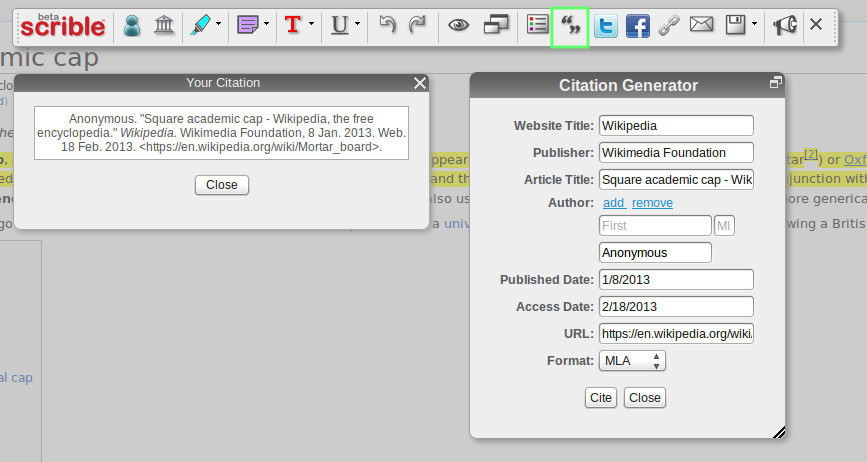
To go along with report writing, we’ve tried to ease a major pain point: proper citations and bibliography creation. We’ve added a citation manager to our Toolbar so that you can create citations right on the webpage or article as you’re working. When you click on the Citation Button in the Toolbar (shown here with the green box around it), you’ll be shown the Citation Generator Window. We autofill some of the citation info and you can easily fill in the rest. Once you’re done, you can automatically create citations with a single click in all the major academic formats, such as MLA, APA and Chicago. This citation info is saved with your article for future use so that once you’ve filled it out, you’ll never need to touch it again.


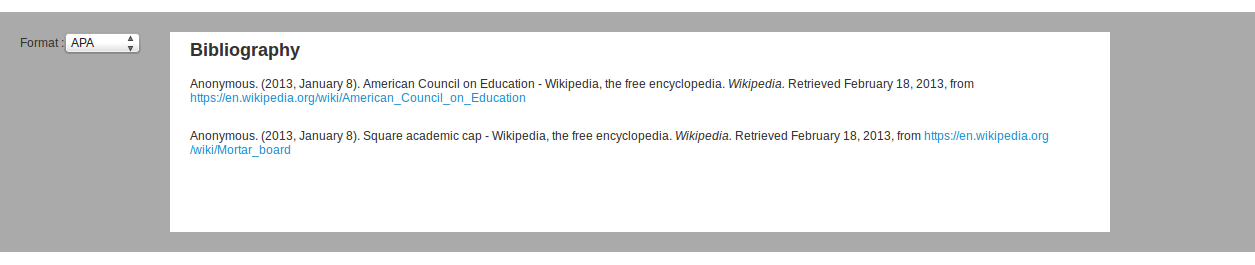
Once you have your citations saved, you can pull them into our dedicated bibliography interface, seen in the screenshot here, or directly into the report interface described earlier.


Summaries

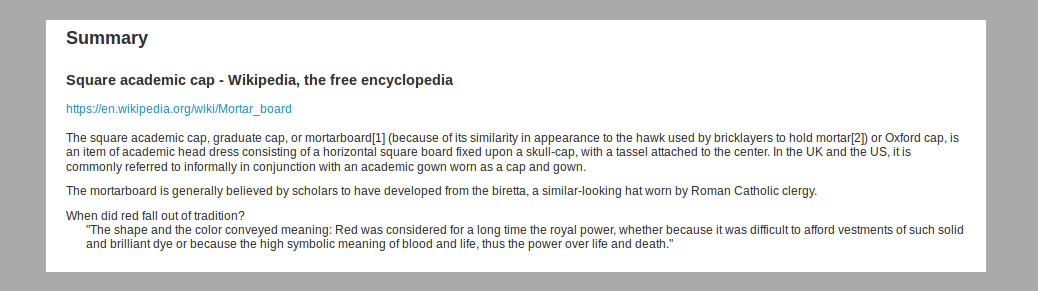
If that all sounds too heavy, we also added a summary view of your annotations along with some meta information about the article. So, you can distill down and extract out just the important highlights and notes. By showing you just the good parts, you’ll have a clean view of what matters most. Shown here is the summary for just one article, but you can pull in as many saved webpages as you like at once.


Shareable Libraries

Lastly, we’ve added the ability to collaborate via multiple, Shareable Libraries. You can now create separate libraries for various groups, topics and projects to keep your saved and annotated articles organized in an orderly fashion. You can also invite other folks to your Shareable Libraries so that you can work together to collect, save and comment on articles and Web content. If you’d like to learn more about Shareable Libraries, check out this blog post.


That’s it for the overview of scrible Student Edition .

Blog curated by Lucian, father, Social Media Curator and teacher,http://xeeme.com/LucianeCurator ;http://bitly.com/LucianEDTech
Curator who win a IPAD in Global Competition with PLN helphttp://bitly.com/LucianeCuratorthankyoubecausewinIpad or simply a educator hwo teach special needs students how to integrate new technologies online web 2.0 and Social Media into the classroomhttp://checkthis.com/fvn/ . Follow https://twitter.com/lucianecurator and http://twitter.com/web20education . Now I write / describe weekly Top 10 http://teacherluciandumaweb20.blogspot.com/ ,and describe daily: curation edtools http://edtech20curationprojectineducation.blogspot.com/ ; startup edtools http://startup4edu.blogspot.com/ , ipad apps http://ipadappsineducationtomlearning.blogspot.com/ . Now I begin to blog also in romanian http://lucianesocialmediacuratorineducatie.blogspot.com/


Liiist lets you save into smart lists the contents of every webpage you visit.
When you save a page into Liiist, everything is collected : title, pictures, videos, price, address, description, features… and all the interesting contents!
Your favorites contents are brought together into lists so you can find and compare them easily.
Your lists are either private or public so you can share them with 1 lover, 2 parents or… 300 friends depending on you desires and needs!
Liiist is the best way to organise your online research and keep all your favorites in one place!


Please help Lucian to win a ipad . All you have to do is to read / comment his guest fINALIST article . CLICK HEREhttp://bitly.com/LucianeCuratorpleaseyoutosharecurationarticle . After you read all blog post BE SOCIABLE. SHARE using only eFront Learning Social Media Buttons ( tweet , share on facebook, google plus , linkedin , delicious , digg, reddit ) before 10 January .
Happy and Successful Year dear friends and in 2013 all your dreams come true and all your wishes to be fulfield .http://bitly.com/LucianeCuratorwishyouHAPPYNEWYEAR2013 - See 2012 year in review http://checkthis.com/fvn/ , a #mentormob web tour with over 100 edtools and edapps maybe you don't know yet :) If you are a social media addcited like me who want to became Edu Curator write with me 1st Curation online eBookhttp://www.widbook.com/book/cover/2425/ .

iCyte Simplify your world – save, annotate and organize all your research securely in the cloud.
Features
iCyte lets you save webpages & PDF's exactly as you remember them. Don't worry, we've crafted our saver to reflect every last detail.
Organize your work or play
iCyte's realtime search ensures you'll instantly find what you're looking for. Remember why it's important with your highlights, tags and notes.
Collaborate on projects
Invite others to your iCyte projects to keep everyone in sync. Grow ideas, make decisions and conquer logistics.

Blog curated by http://bit.ly/LucianEDTechCurator who is father, teacher, researcher and Social Media Curator . Lucian believe that Curation is Social Media King http://bit.ly/CurationKing and for this reason he want to implemet Curation Restart Education Projecthttp://krunchd.com/credproject . Followhttps://twitter.com/web20education for more


Zotero is a free, easy-to-use tool to help you collect, organize, cite, and share your research sources. It lives right where you do your work—in the web browser itself .
Zotero 3.0 marks a major departure from previous versions, most notably with the new ability run outside the Firefox browser. Available for Mac, Windows, and Linux, this standalone version of Zotero contains all the great functionality of the old Firefox-based Zotero but now enables users to integrate Zotero into browsers other than Firefox like Google Chrome and Apple Safari. To all you Firefox lovers out there, no need to worry! Zotero continues to work within Firefox, and even if you choose to run the standalone version, it will talk to Firefox, too.

The standalone version of Zotero isn’t the only major news: Zotero 3.0 is loaded with other new features. Duplicate detection, heavily requested over the last few years, has finally made an appearance. We hope you’ll agree it has been worth the wait: an elegant interface allows users to find and merge duplicate items. Also arriving with Zotero 3.0 is slick new word processor integration. A streamlined dialog box allows users to add and references to documents quickly and efficiently (and it’s pretty, too). References in word processing documents are also now easily shareable with other Zotero users without using groups and even with people using other compatible software.

We’ll highlight this new functionality and more over the next few weeks, but for now we would just like to offer a big thanks to our dedicated user and developer community, whose feedback and contributions were essential in getting this huge release ready for primetime!

Grab your research with a single click.


A personal research assistant.

Zotero is the only research tool that automatically senses content, allowing you to add it to your personal library with a single click. Whether you're searching for a preprint on arXiv.org, a journal article from JSTOR, a news story from the New York Times, or a book from your university library catalog, Zotero has you covered with support for thousands of sites.


Store anything.
Zotero collects all your research in a single, searchable interface. You can add PDFs, images, audio and video files, snapshots of web pages, and really anything else. Zotero automatically indexes the full-text content of your library, enabling you to find exactly what you're looking for with just a few keystrokes.

It has never been easier to sort your research.


Say goodbye to folders.

Zotero organizes your research into collections that act like iTunes playlists. Research items can be added to any number of named collections and subcollections, which in turn can be organized however you like. With saved searches, you can create smart collections that automatically fill with relevant materials as you add them to your library.


Tag it. Assign tags to your library items to organize your research using your own keywords. The tag selector enables you to filter your library instantly to view matching items. Zotero can even use database and library data to tag items automatically as you add them. You’re never more than a click away from a bibliography.


Cite perfectly.


Whether you need to create footnotes, endnotes, in-text citations, or bibliographies, Zotero will do all the dirty work for you, leaving you free to focus on your writing. Create citations in Word and OpenOffice without ever leaving your word processor and add references to an email, a Google Doc, or some other editor simply by dragging one or more references out of Zotero.


Always in style.

Ready to submit your manuscript to Tropical Doctor or French Historical Studies? We've got you covered: with native integration of the powerful and flexible Citation Style Language (CSL), Zotero supports thousands of publication formats with more styles added daily
Your data is always where you need it.

Research everywhere.

Zotero automatically synchronizes your data across as many devices as you choose. Add to your research library on your work PC, and organize your collections on your home laptop. All of your notes, files, and bibliographic data remain seamlessly and silently up to date. Returning from field work? Your data will be waiting for you when you get home.


Painless data transfer.

Upgrading to a new computer? Zotero will automatically pull down a complete copy of your research library from our server network. Even if you don't yet have Zotero installed, you can always access your research from any web browser in the world.
Work together and share with the world.

Works well with others.

Create and join research groups to focus on any topic you choose. Each group can share its own research library, complete with files, bibliographic data, notes, and discussion threads. Tag and analyze your research together with others. Work with a single colleague or an entire class: Zotero groups can include as many members as you please.


Share with the world. Or not.


Zotero groups can be private or public, open or closed. You decide. For example, you and a few colleagues might initially work on a research project in private. After publication, why not share your research notes and library with the world?

Welcome in the new Age of Curationhttp://bitly.com/curationsocialmediaking @https://twitter.com/#!/web20education - wish you all Lucian http://xeeme.com/ecurator/ . I invite to register to join freehttp://bitly.com/docedtech20 #edtech20 #socialmedia #curation projecthttp://web20education.bo.lt/g6538 subscribe free to our new newstellerhttp://bitly.com/edtech20newsteller and Install free our #mlearning apphttp://bitly.com/edtech20mLearningapp .Like and collaborate on facebookhttp://on.fb.me/likeedtech20facebookpage and Circle on Google Plushttp://bitly.com/circleedtech20googlepluspageand Subscribe free to gr8 #edtech20 blogshttp://bitly.com/feededtech20blogs related to new web 2.0, social media startupshttp://bitly.com/web20eblog , curationhttp://bitly.com/curationblog ; mLearning appshttp://bitly.com/mLearningblog , google plushttp://bitly.com/googleplusblog , gr8 bloghttp://bitly.com/egr8blog and my romanian bloghttp://bitly.com/eblogulmeu

f

NEW : Curation topic for all my gr8 blogs

c