Discover the Power of Curation

Showing posts with label curation. Show all posts
Showing posts with label curation. Show all posts


#yahki #startup #curation #edtool ideal mashup of #socialmedia for #education
Sunday, March 23, 2014

The beauty of Yahki is its simplicity as a social learning environment. It’s an amazing tool! Yahki education channel delivers the toolset in a private learning space for each school or campus, yet naturally and safely extends to the wider community, even globally. The following video shows how. Yahki enables everyone to be a learner and everyone to be a teacher, leveraging Web content, mainstream social media, and school/campus and personal digital resources.
Yahki is online, supporting almost every device and language, 24/7. Students and teachers can curate, create, share, assess, refine, collaborate and connect, locally, nationally, globally. Yahki is an open platform that sits across personal, local and enterprise application layers. Yahki reflects where learning is today, overcoming many of the barriers of traditional education.
Teachers and students often refer to Yahki as the 'glue' that brings together content, ideas, creativity, formative assessment and reflection. Yahki is the ideal mashup of social media, the Web and effective learning. Yahki education channel enables users to ‘channel’ specific Web, premium and user- generated content through their school/campus class, peer and teacher networks. Yahki respects the needs of users as members of learning communities and the wider community.
Yahki’s simplicity and the channel concept set Yahki apart, solving issues for learning communities disrupted by Web 2.0. http://education.yahki.com/ enables you to tell your own story - use the web content, links, photos & videos to create a new story & share it with your friends on Facebook and Twitter. Yahki was released to provide the world’s first bridge between mainstream social media and a safe school or campus learning channel. Yahki now allows each student, teacher and parent to easily collect, mash up and ‘channel’ posts safely to their school network (teachers and students) or to their public network (friends and family) in one environment. There is no longer the need for a public social media environment and a separate school environment - Yahki is true to each.
Features :
Collect
Use Yahki to collect items from the Web. Browse or search to collect pictures, text information, video, tweets and posts from the Web. Curate collected items in folders (Yahki Sets) without losing links to original Web sources. Build your Yahki Sets based on interests or studies, all drag and drop
Mash up
Use Yahki to create mashups. Manage and mash up your social media and items collected from the Web. Organize, annotate, and update items, adding your thoughts and perspectives, all from one screen.
Share
Share informal Yahki mashups with friends and family through Twitter, Facebook and Google+. Share professional Yahki mash ups through blogs and networks like LinkedIn
Yahki is online, supporting almost every device and language, 24/7. Students and teachers can curate, create, share, assess, refine, collaborate and connect, locally, nationally, globally. Yahki is an open platform that sits across personal, local and enterprise application layers. Yahki reflects where learning is today, overcoming many of the barriers of traditional education.
Teachers and students often refer to Yahki as the 'glue' that brings together content, ideas, creativity, formative assessment and reflection. Yahki is the ideal mashup of social media, the Web and effective learning. Yahki education channel enables users to ‘channel’ specific Web, premium and user- generated content through their school/campus class, peer and teacher networks. Yahki respects the needs of users as members of learning communities and the wider community.
Yahki’s simplicity and the channel concept set Yahki apart, solving issues for learning communities disrupted by Web 2.0. http://education.yahki.com/ enables you to tell your own story - use the web content, links, photos & videos to create a new story & share it with your friends on Facebook and Twitter. Yahki was released to provide the world’s first bridge between mainstream social media and a safe school or campus learning channel. Yahki now allows each student, teacher and parent to easily collect, mash up and ‘channel’ posts safely to their school network (teachers and students) or to their public network (friends and family) in one environment. There is no longer the need for a public social media environment and a separate school environment - Yahki is true to each.
Features :
Collect
Use Yahki to collect items from the Web. Browse or search to collect pictures, text information, video, tweets and posts from the Web. Curate collected items in folders (Yahki Sets) without losing links to original Web sources. Build your Yahki Sets based on interests or studies, all drag and drop
Mash up
Use Yahki to create mashups. Manage and mash up your social media and items collected from the Web. Organize, annotate, and update items, adding your thoughts and perspectives, all from one screen.
Share
Share informal Yahki mashups with friends and family through Twitter, Facebook and Google+. Share professional Yahki mash ups through blogs and networks like LinkedIn
Dear friends like you notice I don't updated my blog because I don't have so much free time because I was very busy with my school activities/ projects, but dear teachers kindly I invite you to join my Erasmus+ Course developed in partenership with Euneos : ,, Curation Social Media Master Class for education in semantic web 3.0 " Apply http://bitly.com/CurationSocialMediaKingErasmusPlusCourse and discover more http://educuration.wikispaces.com/Main+Page

#Bibblio #startup #curation tool open gateway through knowledge when learn anything, anytime in any format you want
Friday, March 21, 2014

How Bibblio works . Features :
Learn
Bibblio is here so you can learn. Learn anything, anytime in any format you want. Some people call it casual learning – we don’t really care what you call it. Start searching, browsing and learning.
Inspire
Bibblio is also for you who like to help others find inspiration and knowledge. Whether you are creating your own learning materials or just know a whole bunch of good videos, slides, links or books that others can benefit from then you have come to the right place. Help us find by uploading the best stuff from the web so that we can help everybody.
Support
The best way to support Bibblio is to support the guys who make amazing pieces of knowledge. Share their stuff, talk about it and promote it across your social channels. If you share the bibblio link then you help us at the same time. It is that easy. You can also donate directly to the people you really like to allow them to keep up their great work, or you can click here to learn more about how to support Bibblio on it’s way to become the greatest site for knowledge on the internet.
Dear friends like you notice I don't updated my blog because I don't have so much free time because I was very busy with my school activities/ projects, but dear teachers kindly I invite you to join my Erasmus+ Course developed in partenership with Euneos : ,, Curation Social Media Master Class for education in semantic web 3.0 " Apply http://bitly.com/CurationSocialMediaKingErasmusPlusCourse and discover more http://educuration.wikispaces.com/Main+Page
Another promising @avos #startup #curation app launched by @youtube co-founders #Zeen is closing down :(
Friday, October 25, 2013

I write I year ago here about Zeen promising startup curation tool to make awesome online magazines launched by Avos Company whopowers mobile and web applications including MixBit, Delicious, and Wanpai
I recommand to read https://lucianecurator.contently.com/ Top100 #edtools discovered through #iste13 http://bitly.com/iste13edtools
. Let's see what we loose because Zeen Shut Down Friday the 8th of December 2013 accoding to their blog post
Zeens are portable, bite-sized pieces of content that are easy to make and fun to share.
Tell A StoryZeen make it easy for you to tell a story and create something beautiful.
Make It Shine
Your zeen can include words, images, galleries, links, music, videos, maps and lots more.
Portable
Zeens are portable. Post them to Facebook, Twitter and Google Plus. Or embed and share them on your blog.
Zeens are portable, bite-sized pieces of content that are easy to make and fun to share.
Tell A StoryZeen make it easy for you to tell a story and create something beautiful.
Make It Shine
Your zeen can include words, images, galleries, links, music, videos, maps and lots more.
Portable
Zeens are portable. Post them to Facebook, Twitter and Google Plus. Or embed and share them on your blog.
I recommand to read https://lucianecurator.contently.com/ Top100 #edtools discovered through #iste13 http://bitly.com/iste13edtools

Permamarks are a time-specific, on-demand, archive of the public web.
Features :
A personalwebpage archiving tool.
When you bookmark with permamarks, they keep anarchive of the page in its original form.
When you bookmark with permamarks, they keep anarchive of the page in its original form.
The permamark is a point of reference forever – even if the original web page is edited or taken down.
A link
integrity & reliability tool.
Integrity in knowing the content you share now is the same content others will see later. Reliability in knowing the resources you reference will be there when you need them.
An analytical
URL shortening + sharing tool.
Permamarks provide "In-Page" analytics; other services can't track what users do once they reach the page you've shared, only how they got there .
I recommand to read https://lucianecurator.contently.com/ Top100 #edtools discovered through #iste13 http://bitly.com/iste13edtools
Blog curated by Lucian, father, Social Media Curator https://lucianecurator.contently.com/ and teacher,http://xeeme.com/LucianeCurator;http://bitly.com/LucianEDTechCurator who win a IPAD in Global Competition with PLN helphttp://bitly.com/LucianeCuratorthankyoubecausewinIpad or simply a educator hwo teach special needs students how to integrate new technologies online web 2.0 and Social Media into the classroomhttp://checkthis.com/fvn/ . Followhttps://twitter.com/lucianecuratorandhttp://twitter.com/web20education . Now I write / describe weekly Top 10 http://teacherluciandumaweb20.blogspot.com/ ,and describe daily: curation edtoolshttp://edtech20curationprojectineducation.blogspot.com/ ; startup edtools http://startup4edu.blogspot.com/ , ipad appshttp://ipadappsineducationtomlearning.blogspot.com/ . Now I begin to blog also in romanianhttp://lucianesocialmediacuratorineducatie.blogspot.com
A link
integrity & reliability tool.
Integrity in knowing the content you share now is the same content others will see later. Reliability in knowing the resources you reference will be there when you need them.
An analytical
URL shortening + sharing tool.
Permamarks provide "In-Page" analytics; other services can't track what users do once they reach the page you've shared, only how they got there .
I recommand to read https://lucianecurator.contently.com/ Top100 #edtools discovered through #iste13 http://bitly.com/iste13edtools

#streemfire #startup #curation tool for all your media to share memories #edtech20 #pln
Friday, August 9, 2013

Streemfire is a browser based webpage builder designed to give content creators of all types a simpler way to host their media online. It provide users an easy to follow workflow in creating their own all-media webpage. Streemfire use Microsoft standardised cloud technology to encode, store and distribute your media across the globe. Accessible at any time, Streemfire is your tool for organising, curating and sharing your original media across a variety of systems, browsers and devices.Their HTML5 built media player provides your audience with universal access to your media and a high quality play out on PCs, tablets and smart phones. This means no need to download and install native apps.
The Streemfire player does not restrict your choice to show video, images or music files.
Upload a mix of Video, Images and Sound filesTo create your great Streemfire page you're going to need complete flexibility with what you can upload. That's why Streemfire allows you to build your content from Video, Images and Sound files in a range of file formats.
Drag and Drop your media to create a playlist
Once you've uploaded your favourite media items they will appear on your 'Prepare' page. Simply drop them into your playlist zone for playout in the particular Channel you are working with. Don't like their playout order? Simple, just drag and drop to re-order your media and the Playlist is saved automatically!
You can create up to 10 mixed media playlists, but we call them Channels here! This is where Streemfire differs from other media display services. With us you can build up to 10 media channels and manage each one in turn from your Channel Selection bar. The Channel you have selected defines the Channel you are working on when building a playlist. Perfect if you have multiple campaigns or just want to keep things seperate!
Let everyone know what is in your Channels with an awesome Channel cover imageTo let your audience know what kind of media they will recieve by clicking on one of your Channels, we suggest giving each Channel a relevant Channel cover image.
This is easily achieved by using one of your uploaded image files.
Tip: Visit your 'Collect' page and select 'Edit' by clicking the image you would like to use as your Channel cover image, then use the Channel cover image cropping preset for the perfect dimentions.
Personalise your playout with a background image and logo to drive traffic to your blog, website or fanpageStreemfire is a great tool alone or to supliment your pre-existing blog, website or fanpage. Add a beautiful background image or import your existing brand identity with no loss of continuity. We don't want your audience to feel trapped on one page so why not add your logo and link to your website? It's easily done, just select an image from your media library and paste in your link!

Curator who win a IPAD in Global Competition with PLN help http://bitly.com/LucianeCuratorthankyoubecausewinIpad or simply a educator hwo teach special needs students how to integrate new technologies online web 2.0 and Social Media into the classroom http://checkthis.com/fvn/ . Follow https://twitter.com/lucianecurator and http://twitter.com/web20education . Now I write / describe weekly Top 10 http://teacherluciandumaweb20.blogspot.com/ ,and describe daily: curation edtools http://edtech20curationprojectineducation.blogspot.com/ ; startup edtools http://startup4edu.blogspot.com/ , ipad apps http://ipadappsineducationtomlearning.blogspot.com/ . Now I begin to blog also in romanian http://lucianesocialmediacuratorineducatie.blogspot.com
Another interesting #startup #curation tool #catch will be closing up in 30 august .
Sunday, August 4, 2013
https://lucianecurator.contently.com/ recommand to read/share Top 100 #edtools discovered through #iste13 http://bitly.com/iste13edtools

Cath was a interesting curation tool to cath and share what is matter for you . I discover this tool last year, but I forget to write about it im this blog . Now when I received the email that Catch will no longer be available after 30 August 2013 .
Lets's see what we lose .
Catch was designed to make sure you never miss an idea. Capture thoughts, photos and discoveries across all your devices and when you're ready, turn your ideas into action using simple, mobile collaboration.
Lets's see what we lose .
Catch was designed to make sure you never miss an idea. Capture thoughts, photos and discoveries across all your devices and when you're ready, turn your ideas into action using simple, mobile collaboration.
Features
Never Miss an Idea
Capture ideas instantly with the Catch capture wheel
Create voice, photo, and text notes, online AND offline
Share checklists to collaborate on to do lists
Set reminders so you never miss something important
Use email to send web content to note@catch.com
Find and Save All Your Discoveries
Collect your ideas into personal spaces as they develop
Use #tags to label and find your notes easily
Automatically backup notes for free with secure sync to Catch.com
Passcode protect your notes with a 4-digit PIN
Use browser extensions to save URLs and web discoveries
Take Action and Collaborate
Create shared spaces for secure, private collaboration
Use Catch to collaborate with checklists, notes and documents
Everything you create together is backed up across everyone's devices
Never Miss an Idea
Capture ideas instantly with the Catch capture wheel
Create voice, photo, and text notes, online AND offline
Share checklists to collaborate on to do lists
Set reminders so you never miss something important
Use email to send web content to note@catch.com
Find and Save All Your Discoveries
Collect your ideas into personal spaces as they develop
Use #tags to label and find your notes easily
Automatically backup notes for free with secure sync to Catch.com
Passcode protect your notes with a 4-digit PIN
Use browser extensions to save URLs and web discoveries
Take Action and Collaborate
Create shared spaces for secure, private collaboration
Use Catch to collaborate with checklists, notes and documents
Everything you create together is backed up across everyone's devices

Hopper is a new startup to share and read it later.
Features :
1.Pasting
You can paste text (and images, if you use Chrome) from anywhere. Just copy it to your clipboard and paste it on Hopper.
2.Uploading
If you want to upload a file, just drag it from your desktop to anywhere on the page and let go. You'll see a blue circle pop up to show that you did it right!
3.Search
Looking for something you posted yesterday? A week ago? Just search! Try searches like…
before today
after monday
is a picture
is text
a link
You can also mix and match searches ("is a picture after monday")!
4.Sharing
Everything you add to your Hopper gets its own link. You can share this link with anyone! Need a shorter link for Twitter or Facebook? Just click the "Shorten Link" button on any item.
Read It Later lets you save what you find on the web to watch and read on any device, at any time.
Save Content
Save videos, articles or pretty much anything you find interesting to your Read It Later queue.
300+ Apps
Content can be saved from your browser or from over 300 apps like Twitter, Zite, Flipboard and Pulse.
View Anywhere
When you’re ready, view saved content on any of your devices. You don’t even need an internet connection.
Blog curated by Lucian, father, Social Media Curator and teacher, http://xeeme.com/LucianeCurator ;http://bitly.com/LucianEDTech
Curator who win a IPAD in Global Competition with PLN help http://bitly.com/LucianeCuratorthankyoubecausewinIpad or simply a educator hwo teach special needs students how to integrate new technologies online web 2.0 and Social Media into the classroom http://checkthis.com/fvn/ . Follow https://twitter.com/lucianecurator and http://twitter.com/web20education . Now I write / describe weekly Top 10 http://teacherluciandumaweb20.blogspot.com/ ,and describe daily: curation edtools http://edtech20curationprojectineducation.blogspot.com/ ; startup edtools http://startup4edu.blogspot.com/ , ipad apps http://ipadappsineducationtomlearning.blogspot.com/ . Now I begin to blog also in romanian http://lucianesocialmediacuratorineducatie.blogspot.com
Curator who win a IPAD in Global Competition with PLN help http://bitly.com/LucianeCuratorthankyoubecausewinIpad or simply a educator hwo teach special needs students how to integrate new technologies online web 2.0 and Social Media into the classroom http://checkthis.com/fvn/ . Follow https://twitter.com/lucianecurator and http://twitter.com/web20education . Now I write / describe weekly Top 10 http://teacherluciandumaweb20.blogspot.com/ ,and describe daily: curation edtools http://edtech20curationprojectineducation.blogspot.com/ ; startup edtools http://startup4edu.blogspot.com/ , ipad apps http://ipadappsineducationtomlearning.blogspot.com/ . Now I begin to blog also in romanian http://lucianesocialmediacuratorineducatie.blogspot.com
#curata one of the best #curation tool to find, organize & share relevant content #edtech20 #pln
Sunday, June 16, 2013

Curata easily find, organize & share relevant content for you .Curating with Curata, feeds your content need.
Easily find the content you are looking for, organize, and share it out to the channels you choose for your business.
With Curata, you will:
Save time. Efficiently and quickly meet your content marketing needs.
Boost lead generation. Publish compelling content that drives the right audience, enhances SEO, and builds brand awareness.
Be a thought leader. Build trust by becoming the go-to resource on your chosen topic.
Publish consistently. Keep your audience informed with the most relevant and fresh content.
Features :
Curate. Curate with a simple and intuitive workflow so curating content daily is a breeze.
Easy & Intuitive Workflow
Minimize cost and save time by efficiently curating hundreds of articles in just 20 minutes.
Contextualize
Editorialize and annotate curated content with your own unique perspective and commentary.Create & Blog
Author original blog content to complement your curated content, and bring out your own voice.
Image Suggestions
Embellish articles with semantically relevant images suggested via a built-in integration with Zemanta.Curate on the Go
Curate on the go with Curata mobile app, available on iPhone, iPad, Android phones and tablets.
Find. Continuously scours the web to identify relevant content for your business.
Discovers & Uncovers
Continuously retrieves content from around the web including from news, blogs, feeds and social media sources. Get the freshest content day or night.
Manage Your Content Flow
Fine tune your sources to get just the content you want, from just the sources you want. Add, remove or filter content sources as you go.Learns your preferences
Learns what type of content you like and dislike in order to prioritize and suggest relevant content and sources.
Bookmarklet
Quickly add any article as you browse the web using the bookmarklet browser plugin.
Curate Videos
Identifies embedded videos in your content from sites like YouTube and others.
Organize. Catalogs content intelligently so you can find what you're looking for
Categorize Intelligently
Define a taxonomy, and group your content so it's easy to navigate. As you curate, Curata learns to categorize your content automatically.
Trending Topics
Recognizes important and trending topics mentioned in your content. Creates landing pages optimized for long-tail search engine results.
Content Enrichment
Supplements your content with rich meta data including pictures and quotes. Provide a more robust experience for your audience.
Smart Recommendations
Recommends related content based on similar topics, categories and meta data. Engage your audience, and keep them on your site longer.Archive & Index
Build a vast archive of curated content over time. Offer full text search capabilities to your audience to make your content evergreen.Share. Distributes content to one, some, or all of your online destinations.
Site & Blog
Out of the box, publish a full fledged SEO-friendly HTML5 site and blog. Customize the look-and-feel of the site to meet your needs.Social Media
Schedule postings to multiple social media channels with customizable hashtags and author attributions.
Email Newsletters
Create compelling newsletters to keep your audience coming back for more. Capabilities include lead capture, templates, list segmentation, and automated scheduling.
Mobile
Get a mobile optimized site with no additional development required.Feeds
Generate RSS feeds of any curated content to embed as a widget, or read in a feed reader.
CMSes
Seamlessly publish to more than a dozen Content Management Systems (CMS) such as WordPress and Joomla.API
Access all curated content through a powerful API to integrate with other systems.
Analytics & Metrics
Measure the effectiveness of your content across all channels including site, newsletters, and social media in a single location.
Blog curated by Lucian, father, Social Media Curator and teacher,http://xeeme.com/LucianeCurator ;http://bitly.com/LucianEDTechCurator who win a IPAD in Global Competition with PLN helphttp://bitly.com/LucianeCuratorthankyoubecausewinIpad orsimply a educator hwo teach special needs students how to integrate new technologies online web 2.0 and Social Media into the classroomhttp://checkthis.com/fvn/ . Follow https://twitter.com/lucianecurator and http://twitter.com/web20education . Now I write / describe weekly Top 10 http://teacherluciandumaweb20.blogspot.com/ ,and describe daily: curation edtools http://edtech20curationprojectineducation.blogspot.com/ ; startup edtools http://startup4edu.blogspot.com/ , ipad apps http://ipadappsineducationtomlearning.blogspot.com/ . Now I begin to blog also in romanian http://lucianesocialmediacuratorineducatie.blogspot.com/
#shareor #socialmedia #startup #curation and #pln tool just for teachers #edtech20 #pln
Wednesday, May 22, 2013

About Shareor:
Shareor, a free social networking platform for teachers is an initiative designed to simplify communications between teachers. As the first online social network designed exclusively for teachers, Shareor empowers educators to share, collaborate, and connect within the teacher community.Teachers use Shareor to plan their lessons, organize projects, collaborate with colleagues and promote student work online. Teachers can also browse lesson plans created by other teachers to discover new things as well as get inspired from other teachers' interests.
Shareor is an initiative of a group of teachers and is made possible through the generosity of private funders and community partners. The platform is safe, private and secure.
Shareor helps teachers collaborate more easily and better engage with their colleagues. Shareor also helps teachers share information across their organizations, resulting in valuable time and cost-saving benefits.
Blog curated by Lucian, father, Social Media Curator and teacher,http://xeeme.com/LucianeCurator ;http://bitly.com/LucianEDTech
Curator who win a IPAD in Global Competition with PLN helphttp://bitly.com/LucianeCuratorthankyoubecausewinIpad or simply a educator hwo teach special needs students how to integrate new technologies online web 2.0 and Social Media into the classroomhttp://checkthis.com/fvn/ . Follow https://twitter.com/lucianecurator and http://twitter.com/web20education . Now I write / describe weekly Top 10 http://teacherluciandumaweb20.blogspot.com/ ,and describe daily: curation edtools http://edtech20curationprojectineducation.blogspot.com/ ; startup edtools http://startup4edu.blogspot.com/ , ipad apps http://ipadappsineducationtomlearning.blogspot.com/ . Now I begin to blog also in romanian http://lucianesocialmediacuratorineducatie.blogspot.com/
Curator who win a IPAD in Global Competition with PLN helphttp://bitly.com/LucianeCuratorthankyoubecausewinIpad or simply a educator hwo teach special needs students how to integrate new technologies online web 2.0 and Social Media into the classroomhttp://checkthis.com/fvn/ . Follow https://twitter.com/lucianecurator and http://twitter.com/web20education . Now I write / describe weekly Top 10 http://teacherluciandumaweb20.blogspot.com/ ,and describe daily: curation edtools http://edtech20curationprojectineducation.blogspot.com/ ; startup edtools http://startup4edu.blogspot.com/ , ipad apps http://ipadappsineducationtomlearning.blogspot.com/ . Now I begin to blog also in romanian http://lucianesocialmediacuratorineducatie.blogspot.com/
#thotz #socialmedia #startup #curation tool to keep content handy, no sign up required #edtech20 #pln
Friday, May 17, 2013

Simply create a new Thot by adding pictures, text, notes, files and create wonderful single pages you can share or present real easy.
Features :
Set your "thot"
Start your thot with one click, no sign up required.
Write about it
Add all the information you have about it.
Add content
You can integrate content from several services or drag the info.
Organize it
Add chapter and relate content.
Blog curated by Lucian, father, Social Media Curator and teacher,http://xeeme.com/LucianeCurator ;http://bitly.com/LucianEDTechCurator who win a IPAD in Global Competition with PLN helphttp://bitly.com/LucianeCuratorthankyoubecausewinIpad or simply a educator hwo teach special needs students how to integrate new technologies online web 2.0 and Social Media into the classroomhttp://checkthis.com/fvn/ . Follow https://twitter.com/lucianecurator and http://twitter.com/web20education . Now I write / describe weekly Top 10 http://teacherluciandumaweb20.blogspot.com/ ,and describe daily: curation edtools http://edtech20curationprojectineducation.blogspot.com/ ; startup edtools http://startup4edu.blogspot.com/ , ipad apps http://ipadappsineducationtomlearning.blogspot.com/ . Now I begin to blog also in romanian http://lucianesocialmediacuratorineducatie.blogspot.com/
#cloudfinity #startup #curation tool Unifies all your cloud storage accounts into 1 Big Virtual Drive #edtech20 #pln
Tuesday, May 14, 2013
Blog curated by Lucian, father, Social Media Curator and teacher,http://xeeme.com/LucianeCurator ;http://bitly.com/LucianEDTechCurator who win a IPAD in Global Competition with PLN helphttp://bitly.com/LucianeCuratorthankyoubecausewinIpad orsimply a educator hwo teach special needs students how to integrate new technologies online web 2.0 and Social Media into the classroomhttp://checkthis.com/fvn/ . Follow https://twitter.com/lucianecurator and http://twitter.com/web20education . Now I write / describe weekly Top 10 http://teacherluciandumaweb20.blogspot.com/ ,and describedaily: curation edtools http://edtech20curationprojectineducation.blogspot.com/ ; startup edtools http://startup4edu.blogspot.com/ , ipad apps http://ipadappsineducationtomlearning.blogspot.com/ . Now I begin to blog also in romanian http://lucianesocialmediacuratorineducatie.blogspot.com/
#scriblestudent #socialmedia #startup #curation tool to read, research and share the web #edtech20 #pln
Wednesday, May 8, 2013

that adds the sweet features shown below.
If you already use scrible and registered with a “.edu” email address, you can upgrade to the Student Edition for free from the Settings Page in your account. If you’re a new student signing up with a .edu email address, you’ll be shown an option to upgrade for free during the sign up process. If you have a .edu email address but didn’t originally sign up with it, you can add it as a secondary email address via your Settings Page. This will then allow you to make the upgrade and use http://www.scrible.com/student
5 Powerful New Features
The 5 powerful new Student Edition features enable you to create sophisticated reports from you researched articles, easily capture citations while you’re reading online, generate bibliographies with one click, distill all of your highlights and notes into simple summaries and collaborate with others via group, topic or project specific Shareable Libraries. Nearly all of these features (except for citation capture) are accessible from within your Library (as shown here) once you’ve upgraded to the Student Edition.
Reports
The first new feature is a robust report interface. We’ve added the ability to bring the annotations from your saved articles into a rich text editor. Once you’ve selected the articles you want to work with and clicked the Add to Report Button in your Library, we take you to the report interface, which is a split pane view with the articles shown in a Source List on the left and the text editor on the right. You can selectively click on annotations in the Source List to add them to the report on the right. This allows you to easily bring your annotations into the editor and integrate them into your reports using the fully featured editor. Once you’ve finished writing, you can share the report using all the methods you’re used to, such as social media, permalink and email.

Citations & Bibliographies
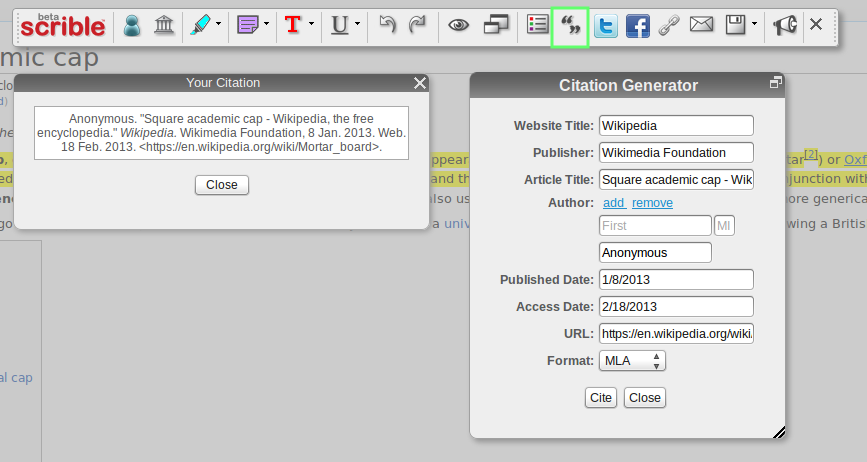
To go along with report writing, we’ve tried to ease a major pain point: proper citations and bibliography creation. We’ve added a citation manager to our Toolbar so that you can create citations right on the webpage or article as you’re working. When you click on the Citation Button in the Toolbar (shown here with the green box around it), you’ll be shown the Citation Generator Window. We autofill some of the citation info and you can easily fill in the rest. Once you’re done, you can automatically create citations with a single click in all the major academic formats, such as MLA, APA and Chicago. This citation info is saved with your article for future use so that once you’ve filled it out, you’ll never need to touch it again.
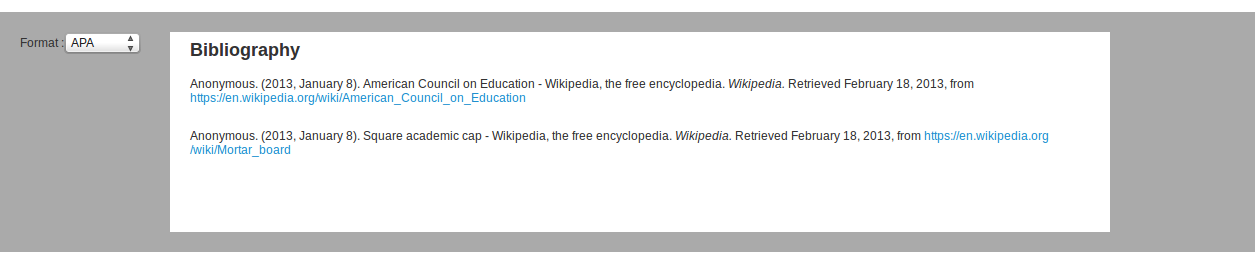
Once you have your citations saved, you can pull them into our dedicated bibliography interface, seen in the screenshot here, or directly into the report interface described earlier.
Summaries
If that all sounds too heavy, we also added a summary view of your annotations along with some meta information about the article. So, you can distill down and extract out just the important highlights and notes. By showing you just the good parts, you’ll have a clean view of what matters most. Shown here is the summary for just one article, but you can pull in as many saved webpages as you like at once.
Shareable Libraries
Lastly, we’ve added the ability to collaborate via multiple, Shareable Libraries. You can now create separate libraries for various groups, topics and projects to keep your saved and annotated articles organized in an orderly fashion. You can also invite other folks to your Shareable Libraries so that you can work together to collect, save and comment on articles and Web content. If you’d like to learn more about Shareable Libraries, check out this blog post.

That’s it for the overview of scrible Student Edition .
Curator who win a IPAD in Global Competition with PLN helphttp://bitly.com/LucianeCuratorthankyoubecausewinIpad or simply a educator hwo teach special needs students how to integrate new technologies online web 2.0 and Social Media into the classroomhttp://checkthis.com/fvn/ . Follow https://twitter.com/lucianecurator and http://twitter.com/web20education . Now I write / describe weekly Top 10 http://teacherluciandumaweb20.blogspot.com/ ,and describe daily: curation edtools http://edtech20curationprojectineducation.blogspot.com/ ; startup edtools http://startup4edu.blogspot.com/ , ipad apps http://ipadappsineducationtomlearning.blogspot.com/ . Now I begin to blog also in romanian http://lucianesocialmediacuratorineducatie.blogspot.com/
#backstitch #startup #curation app makes your personal web beautiful ,organized, connected #edtech20 #pln
Tuesday, April 16, 2013

Backstich is a personal web experience that aggregates content from your favorite websites and services into a consistent user interface. Unlike other 'data aggregators' backstitch translates information into descriptive formats such as articles, photos, and products. With this common format backstitch is able to provide a consistent experience (regardless of source) as well as allow for detailed personalization such location search, price limits, and social filtering.
Blog curated by Lucian, father, Social Media Curator and teacher, http://xeeme.com/LucianeCurator ;http://bitly.com/LucianEDTech
Curator who win a IPAD in Global Competition with PLN help http://bitly.com/LucianeCuratorthankyoubecausewinIpad or simply a educator hwo teach special needs students how to integrate new technologies online web 2.0 and Social Media into the classroom http://checkthis.com/fvn/ . Follow https://twitter.com/lucianecurator and http://twitter.com/web20education . Now I write / describe weekly Top 10 http://teacherluciandumaweb20.blogspot.com/ ,and describe daily: curation edtools http://edtech20curationprojectineducation.blogspot.com/ ; startup edtools http://startup4edu.blogspot.com/ , ipad apps http://ipadappsineducationtomlearning.blogspot.com/ . Now I begin to blog also in romanian http://lucianesocialmediacuratorineducatie.blogspot.com
#wunderlist #startup & #startupeurope #pln and #todo list tool transformed in a #curation tool 4 all devices #edtech20 #pln
Friday, March 29, 2013

Wunderlist is here to help you get things done. Like I told you before Curation is now Social Media King and if you are agree leave a comment after you read the features .
Whether you're planning an overseas adventure, sharing a shopping list with a loved one or simply keeping track of your daily to-dos.Available for free on all your devices with next features :
Lightning fast performance and invisible syncNowadays, we are all using several different devices throughout the day, from mobile and tablets to desktop and web. Knowing this, Wunderlist 2 has gone native on all major platforms — Mac, iPhone, Web, Android and Windows PC. The switch to native apps guarantees a fast and stable performance no matter how many different devices you are using. What’s more, thanks to the brand-new server architecture your lists will automatically be synchronized via Wunderlist’s incredibly clever Cloud Sync. So clever in fact, the synchronization will happen without you even recognizing.
Reminders, Recurring and Subtasks
Everything you need, plus a little moreDo you like to work towards a deadline? Do you have things to do that never change? Or do you prefer to split big tasks into smaller steps? Wunderlist now features the new Detail View including Reminders along with Recurring and Subtasks. Guaranteeing your activities are kept on track and on time with little effort — again, again and again.
Brand new design
A love that goes beyond first sightWhen you first take a look at Wunderlist 2 it will feel familiar, yet completely new at the same time. Wunderlist has been redesigned to include all new stunning graphics that look even better on retina displays. Just take a look at the new icon, the nice subtle paper texture of a task and the handmade pictograms in the sidebar. The only way to achieve a design like this is by relentlessly considering and reconsidering every single piece — including the details you don’t directly see, but will no doubt experience.
Seamless collaboration
With a little help from your friendsWant to get your colleague’s assistance on an upcoming presentation? Or maybe you want to share the fun of organizing a birthday party with a friend? Wunderlist now makes it downright simple to invite your friends, family and colleagues to lend a helping hand. Through the smart integration of Facebook’s Open Graph and your personal address book all you need to do is hit “Invite” and wait for them to join. Oh, and if they are not yet a Facebook friend simply type in their email address. Sharing in Wunderlist has never been easier.
Push, Email and In-App Notifications
Always be the first to knowWant to know if a friend has invited you to a list? Or has a colleague added a task to the latest project? Customize the way you want to be kept informed with Wunderlist 2. Depending on your preference you can receive updates to your shared lists via push notifications, email or simply head to Wunderlist’s new Activity Center. The choice is totally up to you.
Smart Lists
The full package – beauty and intelligenceWunderlist's new interface is even more intelligent. It now shows you everything you need exactly when you need it. Instead of having filters permanently visible we integrated the new concept of Smart Lists that are hidden if there’s nothing to be shown. If you worked a lot with the former filter function you can easily make Smart Lists visible permanently through the preferences panel. With this approach we can deliver an even simpler experience, while at the same time offer advance users even more functionality.
Data security
Keeping your data secure 24/7Millions of people and thousands of businesses worldwide use Wunderlist to manage their lists and daily to-dos. So protecting your data is of paramount importance.. So there is no need to worry — you can trust your data is safe with us.
Sticky Notes 2.0
Capture all your best ideas
Whether you are student, an aspiring chef or an established author Wunderlist 2 has your note taking requirements covered. Just open the front cover to experience clever features like web link integration and auto save, along with the ability to attach and detach a note from a task, allowing you to work in the detailed view or out of the app itself, it’s entirely up to you.Print your Lists
Travel light with everything you need on paperWith Wunderlist you can print your lists with just a few clicks. Whether it’s a team meeting agenda, shopping list or your very own wish list, you can travel light with all the details you need on paper.
Add to Wunderlist Browser Extension
The whole web is just a click awayAdd to Wunderlist is a Chrome, Firefox and Safari browser extension that appears in your navigation bar, allowing you to quickly save all your favorite web content directly into Wunderlist. To make it even easier Add to Wunderlist places a second button directly on some of your favorite websites, starting with Amazon, Asos, Ebay and Etsy, Hacker News, Twitter, Wikipedia and Youtube, as well as the most popular web email clients, Gmail, Outlook and Yahoo! Mail.
Blog curated by Lucian, father, Social Media Curator and teacher,http://xeeme.com/LucianeCurator;http://bitly.com/LucianEDTech
Curator who win a IPAD in Global Competition with PLN helphttp://bitly.com/LucianeCuratorthankyoubecausewinIpador simply a educator hwo teach special needsstudents how to integrate new technologies online web 2.0 and Social Media into the classroomhttp://checkthis.com/fvn/ . Followhttps://twitter.com/lucianecurator andhttp://twitter.com/web20education . Now I write / describe weekly Top 10http://teacherluciandumaweb20.blogspot.com/ ,and describe daily: curation edtoolshttp://edtech20curationprojectineducation.blogspot.com/; startup edtools http://startup4edu.blogspot.com/, ipad appshttp://ipadappsineducationtomlearning.blogspot.com/. Now I begin to blog also in romanianhttp://lucianesocialmediacuratorineducatie.blogspot.
#curatr #socialmedia #curation #startup transform #elearning using a social learning platform #edtech20 #pln
Wednesday, March 27, 2013

Have you ever been talking with someone cool and wondered what blogs they read? Music they like? TV shows they watch? Podcasts they pod? Of course, you don't want to know every show they watch, just their favourites.
In the Offline World you show a lot of things off on a living room bookshelf. Since a real bookshelf only holds so many things, you thoughtfully choose to display only the best items — the things that mean the most to you.
Curatr encourages the same thoughtful selection by providing space for 9 items for each curation. Select items and visually customize your curations. Friends can quickly view, discuss, and debate the choices, as well as show off their own curations.
So now go curate!
After meeting someone interesting at a dinner, visit their Curatr profile to see what blogs they read.
Find new people with similar tastes to you and see what else they like.
Get great content recommendations from Curatr based on curations from similar Curators.
Curatr worked hard to make this useful and fun. We hope you’ll enjoy and would love feedback!
You can use Curatr to transform learning resources into a Rich, Active and Social Learning experience. Curatr unique platform encourages users to reflect, curate and build their understanding as they collaborate with their peers in a social learning environment.
Features
Integration
Curatr can act both as a stand-alone solution and as a layer on top of existing systems. With Curatr's API and our flexible delivery solutions, Curatr can integrate with a wide-range of existing software, from Single Sign On solutions to content and reporting.
Visualisation
Curatr presents learning objects in a highly scalable, visual interface. Each object is represented by a node which carries an image and several dynamic pieces of information to tell the user more about what is 'behind' the click. Using this approach any digital content can be linked to and curated by your learners.
User-Generated Content
Curatr allows learners to contribute back to the platform in a wide-range of ways. From adding objects or uploading content, to creating comments and peer voting on test responses, no other learning platform caters to UGC in the same way Curatr does.
Object Orientated Discussion
There's nothing sadder than an empty forum. Which is why you won't find any here! Unlike some other Social Learning platforms, discussion is baked in to Curatr, with opportunities for learners to reflect on every piece of content.
Unique Testing Options
Challenge your learners to build new learning objects as a part of the learning process. Testing options include standards such as MCQ's and Discussion Questions, but also ask learners to stretch themselves by adding new objects, uploading assignments and peer marking.
Gamification
Curatr taps into the power of Gamification to encourage users to contribute and collaborate with each other at every stage of the process. With a comprehensive Experience Points and Levels system intertwined with varying difficulty settings, you can craft the perfect scaffolding and flow for your users.
Reporting
Curatr creates rich reports of your learner's progress, allowing you to not only check on overall progress, but on effort throughout a programme. All of our reports can be output to a variety of formats and systems.
Blog curated by Lucian, father, Social Media Curator and teacher,http://xeeme.com/LucianeCurator ;http://bitly.com/LucianEDTech
Curator who win a IPAD in Global Competition with PLN helphttp://bitly.com/LucianeCuratorthankyoubecausewinIpad or simply a educator hwo teach special needs students how to integrate new technologies online web 2.0 and Social Media into the classroomhttp://checkthis.com/fvn/ . Follow https://twitter.com/lucianecurator and http://twitter.com/web20education . Now I write / describe weekly Top 10 http://teacherluciandumaweb20.blogspot.com/ ,and describe daily: curation edtools http://edtech20curationprojectineducation.blogspot.com/ ; startup edtools http://startup4edu.blogspot.com/ , ipad apps http://ipadappsineducationtomlearning.blogspot.com/ . Now I begin to blog also in romanian http://lucianesocialmediacuratorineducatie.blogspot.com/
#mylist #socialmedia #startup #curation tool to share things that matter to you #edtech20 #pln
Monday, March 25, 2013

MyList is a startup to Keep everything you love in one place: Facebook!
Discover cool things, save them, and share them with your Facebook friends. Keep the things you find on the web ... pictures, articles, recipes, or whatever you like ... all inside Facebook, where it's easy to view and share them later.
Available for iOS and Android
Now myList can go everywhere you go! Access your lists, your friends' lists, and keep up with the new things that get added on myList, while on your mobile device.
Don't miss the "more like this" feature (a mobile exclusive) that will redefine how you search for and discover new things on the web!
Do you like this app, or you know other curation apps like this ? If yes leave a comment
Blog curated by Lucian, father, Social Media Curator and teacher, http://xeeme.com/LucianeCurator ;http://bitly.com/LucianEDTech
Curator who win a IPAD in Global Competition with PLN help http://bitly.com/LucianeCuratorthankyoubecausewinIpad or simply a educator hwo teach special needs students how to integrate new technologies online web 2.0 and Social Media into the classroom http://checkthis.com/fvn/ . Follow https://twitter.com/lucianecurator and http://twitter.com/web20education . Now I write / describe weekly Top 10 http://teacherluciandumaweb20.blogspot.com/ ,and describe daily: curation edtools http://edtech20curationprojectineducation.blogspot.com/ ; startup edtools http://startup4edu.blogspot.com/ , ipad apps http://ipadappsineducationtomlearning.blogspot.com/ . Now I begin to blog also in romanian http://lucianesocialmediacuratorineducatie.blogspot.com
Subscribe to:
Posts (Atom)